Showing posts with label problem. Show all posts

Sunday, December 9, 2012

Issue with iOS 6 Game Center landscape app issue fixed

Got my iPhone 5 temporarily working by connecting to WiFi while still waiting for the new SIM. First thing I did was obviously download my 2 games from App Store and have a go, but to my biggest shock, Where Is It Smart Kids Edition crashed after the splash page, how could this be??!!

Tried it in XCode and it crashed too! Error message as below:


2012-12-09 20:53:19.490 Where is it[395:907] *** Terminating app due to uncaught exception 'UIApplicationInvalidInterfaceOrientation', reason: 'Supported orientations has no common orientation with the application, and shouldAutorotate is returning YES'
*** First throw call stack:
(0x3978d3e7 0x387e6963 0x3978d307 0x33005857 0x331a9f21 0x33089cdd 0x33088f6b 0x39790ad4 0x396e828f 0x331a70f3 0x352b2e01 0x32575793 0x325755db 0x32578e45 0x397611b1 0x396d423d 0x396d40c9 0x3983033b 0x32ff1291 0xdf2d9 0x4c410)
libc++abi.dylib: terminate called throwing an exception
(lldb) 

Found this link from Stackoverflow.com which describes something similar to what I am experiencing, which only happens to iOS 6 Game Center for Apps only supporting Landscape display.  Delete the app and download from App Store again and test with Game Center logged in, and it works without problem. Problem identified!

Urh, hang on, I thought I fixed the problem in previous release already??!! Further investigation shows I missed something in my last release. And as my 3GS always has Game Center logged in, that's why it wasn't picked up during pre-release testing, damn! Definitely have to add this testing next time.

The fix is easy, before, the setup looks like this:

Just need to click on the 2 "Portrait" and "Upside Down" icons in "Supported Interface Orientations" and that fixed the problem. The setup now looks like this:


Issue fixed. Lucky the App Store still available before 20th December, hope there's not too many apps waiting for review and can still get reviewed before Christmas with the normal 7-8 days waiting time, fingers crossed...
 

Wednesday, September 26, 2012

Another issue with Appirater [with workaround]

Tried Appirater with my other game "Mespfi", which is a pure Cocoa game. Strangely as shown below, all the values stored in Localized.strings wouldn't load properly, only the key name been displayed instead.


First thought was Xcode 4.5 issue or not setup Localization properly after migrated to XCode 4.5, or the Localized.strings file problem. Tried lots of debug logging but still couldn't work out why. Then slowly back-out all the changes one by one, and found that when I disabled Appirater completely (remove the "#import "Appirater.h"" line in AppDelegate.m) then it starts working! What the...

Still not quite sure what's wrong, I then tried moving content from one of the Appirater Localized.strings file to mine and then delete it from Appirater, and it works! Looks like some sort of conflict betweens the new Localized.strings files from Appirater with my existing ones? I deleted all those extra language files which my App doesn't support, and merge the rest into mine, and all works ok after that...

Tuesday, September 25, 2012

Localisation in XCode 4.5 drives me crazy [Fixed]

Don't know why, after upgraded to XCode 4.5, testing localisation becomes a nightmare...

First I was stuck due to can't find the plus/minus buttons, finally found that it's been relocated after XCode 4.4, as I was on Xcode 4.3.3 before the upgrade, so wasn't aware about this.

Then found that if I change the language in simulator to Spanish, when it runs it's still in English. Deleted app from simulator, clean and re-run again, it works, then tried again, back to English again. Similar problem happens with the other languages too... I start wondering is adding multiple language support really worth the effort as I felt getting crazy after all these confusing, almost random test results...

Luckily, I found this work around by "VictorT". Listed below for your reference. I think it's adding extra step to copy the localizable.strings file over and to be honest don't really understand why, but most importantly - this fixed my problem!

  1. Remove application from device
  2. Select root node of project tree to get project's properties
  3. Select "Build Phases" tab
  4. Click "Add build phase" and select "Copy files"
  5. Select "Resources" in "Copy files" view
  6. Add Localizable.strings file
  7. Perform "Clean" for the project
  8. "Build and Run"

Issue with Appirater [With workaround]

I was adding Appirater to my game, however found a problem.

It works perfectly with iPad, as shown below:

However, when it's in iPhone, probably due to it's running in Landscape mode, there wasn't sufficient space to fit in both the title plus the message, therefore the message got cut-off...

I tried shorten the message, but then it would be very confusing. After some research, I found this post by Himanshu Sharma about how to change the font size, which is the most simplest solution for me. There are also others talking about creating fully customised alert view, but I think that's a bit too much for me. I just need a simple workaround to fit in my messages.

After a few adjustments, I shorten the message a bit, adjusted the font size to be smaller, remove the message body (use message as title), and got it sort of working as below. For iPad, I just leave it as it is.


If you look at the screen dump on Appirater site, you will see that it's in Portrait mode, that's why it can display the full message on iPhone.

If your game is in Landscape like mine, hope you find this work-around helpful!

Please let me know if there's any better way to fix this issue, as I really want the whole message title and body to be properly displayed in both iPad and iPhone without any workaround if possible.

Problem with TPG??

Tried to logon to my blog from home ADSL2 network, strangely Safari shows a blank screen and hung for a long time. Tried FireFox and this is what I got:

"Server not found" error for the top half, then a huge blue strip, then part of my last post at the bottom. What the??!!

Tried on my iPhone, and it loads up straight away!? Very strange.

I unplugged the network cable, use my iPhone's personal hotspot and everything works!

Must be problem with my ISP TPG and found all sites related to "xxx.blogspot.com" have the same problem. My iPhone uses Telstra network and has no issue browsing all sites. Looks like have to use my iPhone's "more expensive and slow" connection for tonight until issue resolved...

Lucky I have a backup, otherwise would be stuffed.

Friday, September 21, 2012

iPhone 3GS ARMv7 issue with XCode 4.5 fixed!

A not-so-happy start
At first I was a bit depressed today, as both my apps failed to compile in Xcode 4.5, plus from yesterday's bad experience - Xcode 4.5 won't generate the ARMv6 code to run on my old 3GS, then found old Xcode 4.3.3 disappeared, only have much older 4.2 left, looks like I might need to keep 2 versions of code !!??

What a mess...

Quickly worked out an action plan - I am going to uninstall Xcode 4.5, install Xcode 4.3 (or 4.4), then install Xcode 4.5 on a different folder - hope that they can co-exist. So that at least I can have the latest 4.3 or 4.4 to test the app on my 3GS, and then test on iOS 6/iPhone 5 (4 inch retina) simulator using Xcode 4.5. That's the best work around I can think of - until I got a replacing device (iPhone 5?) to test with... Hopefully very soon...

New discovery
Then while looking for further details about that ARMv7 error, I saw "PSA: Do not release ARMv7s code until you have tested it" from "Wandering Coder" talking about:

...when ARMv7 was introduced with the iPhone 3GS, ARMv6 kept being the default and there was an added “optimized” setting that built for but ARMv6 and ARMv7 if you wanted it...

Wait, what? ARMv7 was introduced with iPhone 3GS! So it's "iPhone 3G" that doesn't support ARMv7, my iPhone 3GS should be able to run ARMv7 code! But then why did Xcode 4.5 refuse to do it and complaints about ARMv7??

Further investigation...
Have a closer look at the error message again:


ld: file is universal (3 slices) but does not contain a(n) armv7s slice: /Users/qq/Documents/iOS.Dev.Projects/Where is it ?/Buzz.a for architecture armv7s
clang: error: linker command failed with exit code 1 (use -v to see invocation)


Also read that article the second time, slowly. So it's actually complaining about "ARMv7s", not "ARMv7". And looks like "ARMv7" and "ARMv7s" (in the error message) are actually 2 different things!

Problem fixed
Following the article, I checked the "Architectures" values under "Build Settings", and as below, it says "Standard (armv7, armv7s)".


If I double click to modify the value, as shown below, it changed to "$(ARCHS_STANDARD_32_BIT)", no idea what does that mean...

I captured a screen dump as backup, removed the value and added new one "armv7" without the "s", and it works! Xcode 4.5 can now compile my app and install it on my 3GS successfully, yeah!

Huston, we got another problem...
The app starts up on the phone without problem, the splash page loaded, and then it crashed! WTF ##@$$%^&*(!!!...

Error message as below:


2012-09-21 17:32:07.425 Where is it[747:907] *** Terminating app due to uncaught exception 'UIApplicationInvalidInterfaceOrientation', reason: 'Supported orientations has no common orientation with the application, and shouldAutorotate is returning YES'
*** First throw call stack:
(0x359c52a3 0x3a3db97f 0x359c51c5 0x343d9897 0x3457e579 0x3445dd45 0x3445cfcf 0x359c89c4 0x3591ffeb 0x3457b733 0x3a7fbd2d 0x316c211f 0x316c14b7 0x316c2dcb 0x35998f3b 0x3590bebd 0x3590bd49 0x358392eb 0x343c5301 0xc0481 0x2d588)
libc++abi.dylib: terminate called throwing an exception 


Spent a lot of time adding different debug/logging but still couldn't workout what's wrong. Then googled the last line "libc++abi.dylib", also couldn't find anything related....

I almost gave up.... Then tried googling the "UIApplicationInvalidInterfaceOrientation" and found a work around!!

Problem #2 also fixed!
I followed the instructions:
1) enable all orientations in project summary
2) as my project uses Cocos2D, and don't have that "application:supportedInterfaceOrientationsForWindow", so nothing to remove
3) Add the extra code below in the RootViewController.m

- (NSUInteger)supportedInterfaceOrientations {
return UIInterfaceOrientationMaskLandscape;
}

And it works! Yeah!

I guess I still have to switch back to "ARMv7s" and my old 3GS has to be replaced sooner and later any way, but at least I can hang on to it for a little longer while fixing both my apps for iOS6/iPhone 5!!

And I understand that once I switched to "ARMv7s" all the third party libraries has to be in "ARMv7s" too! Don't want to think about that now, already got lots of things to worry about that....

At least one major issue resolved, what a relieve...

[Update 22/Sep/2012]
You can find some other helpful info in Hacking up an armv7s library by Matt Galloway

Thursday, September 20, 2012

First day with XCode 4.5

Upgraded my iPhone 3GS to iOS 6 and quite happy to see the "Personal Hotspot sharing through USB not working" issue fixed.

However, after I downloaded Xcode 4.5 and tried to compile my 2 games, both failed... Still working on resolving the issues at the moment.

First it automatically asked to add this new launch image called "Default-568h@2x.png" - which is a really strange name. And it's an empty, black 640 x 1136 image.


Then there's lots of warnings about Cocos2D 1.0 library - as it still compiles, I just ignore it for now.

When runs in simulator, for "Where is it Smart Kids Edition" which is landscape, it shows 2 ugly black bars on both side.

While for "Mespfi", which is portrait, the ugly bars are now on the top and bottom...

I wasn't too worry about that as this just means some image adjustment plus UI changes.

However when I tried to run both apps on the physical device, both failed with similar error as below, one for Nextpeer and one for Buzzdoes.


ld: file is universal (3 slices) but does not contain a(n) armv7s slice: /Users/xxxxxxxxxxx/Buzz.a for architecture armv7s
clang: error: linker command failed with exit code 1 (use -v to see invocation)

ld: file is universal (3 slices) but does not contain a(n) armv7s slice: /Users/xxxxxxxxxx/Nextpeer.framework/Nextpeer for architecture armv7s
clang: error: linker command failed with exit code 1 (use -v to see invocation)


Thanks to Daniel/Nextpeer, looks like it's because Xcode 4.5 no longer supports the older arm v6 architecture on my old 3GS. I might have to maintain 2 versions of code - one for arm v6 and one for arm v7. But then when I searched through my MacBook Pro, found that the previous version Xcode 4.3.3 no longer existed and can only find Xcode 4.2!  Xcode 4.5 must have overwritten 4.3.3, what the....

Still wondering whether should I get a new iPhone 5, or just get the latest iPod and save the money for an Android phone. As I am a bit unhappy about the way Apple ignoring older devices and upgrading so frequently/quickly, felt a bit unsecured to invest all the effort and get locked into one single platform which changes so quickly... Oops, this reminds me about the Unity thing which I haven't touch for a week or now... I wish I can have more time doing all these development work.

[Update 24/Sep/2012]
Issue with "armv7s" error fixed by changing it to "armv7" and it runs on my iPhone 3GS without problem. For further details, please see this post. Thanks.


Wednesday, September 12, 2012

OpenGL error 0x0506 in -[EAGLView swapBuffers]

While integrating buzzdoes to my "Where is it Smart Kid edition" game, I found that if I trigger buzzdoes using the popup (when the app first loaded, not the button on the main menu), it will hung when I exit buzzdoes and return to game. Can see tones of error as below:


2012-09-12 23:53:24.717 Where is it[21084:707] failed to call context
2012-09-12 23:53:24.723 Where is it[21084:707] cocos2d: surface size: 480x320
2012-09-12 23:53:24.726 Where is it[21084:707] Failed to make complete framebuffer object 8cdd
OpenGL error 0x0506 in -[EAGLView swapBuffers]
.......


The strange thing is, it works without problem in simulator. It only hung and show this error message in the log when I test on the iPhone 3GS (iOS5.1.1) device. Found quite a few people on the net also had the same issue.

If I test it on the iPad 2 (iOS5.0.1) device, it also hung, but didn't show anything in the log...

Sent all these info to Arthur/buzzdoes, see if they can work out what's wrong...

The Cocos2D version I am using is 1.0.1 as shown below from "cocos2d.h"

// 0x00 HI ME LO
// 00   01 00 01


#define COCOS2D_VERSION 0x00010001


According to this old page, "0x0506 means: INVALID_FRAMEBUFFER_OPERATION_EXT" Urh.....What is that?

Continue researching....

[Update 16/Sep/2012]
Thanks to help rfom Arthur and Elad from buzzdoes, they released a fix and after a few test, the issue has been resolved. Though still don't know much about that OpenGL error, at least the whole thing is working ok now.

I could have submitted the current version to App Store as Arthur suggested, but I really want to wait 1-2 more weeks to get the app working and tested for iOS 6 and iPhone 5, at least in the simulator, as I am still waiting for the local telcos to release plans for iPhone 5.

Will do another few more days of testing, if all goes well, I might even integrate buzzdoes to my second game Mespfi too!

Sunday, September 9, 2012

Problem after added mobile to my GMail account

Can't remember when it started, when accessed from browser, Gmail keep popping up this extra screen asking me to add my mobile number for security reason after logged on. And even if you tried to skip it, it then shows you another annoying confirmation. What the %#$%^$&%^^$#$#.......


Until recently, I finally gave in and added my mobile. Seems ok at the beginning, just that if I logged in to a different machine, it will send me an SMS with verification code and I have to entered the received code to login. Well, it's for security, so can't complaint too much.

Then I found a major issue, yes, big one.

I have been using the iPhone buit-in Mail app to access my GMail from ages ago since I first got my phone. Yes, 3GS is very old now, hey, everyone is holding off their upgrade waiting for the latest iPhone 5 right?? Me too!

Any way, I found that since I added mobile number to GMail, my Mail app stopped working! It keeps telling me "The user name of password for Gmail in incorrect". I know my password and user name are correct as I can successfully logon from safari on the same iPhone!

You might say, well, just use safari or install Gmail app to read your mail then. Well, that only fixes part of the problem. Don't forget that the built-in Mail app is the default mail client on iPhone. If you are in an app with mail capability (e.g. Safari, ...etc) and want to send something to someone, the mail client that pops up is the Mail app - which is now no longer working! Or, please let me know if anyone knows how to change the "default" mail client on iPhone to "Gmail" app.....

Also, as shown below, when I first logon to the Gmail app, it also asked me to enter verification code sent by SMS.

So I start wondering, is it because after I logged on to the Mail app, it doesn't have the capability of processing that verification code thing and therefore failed the login process??!!

Mystery.... Any one got better idea or know how to fix it, please let me know! Thanks!

[Update 16/Sep/2012]
The official name of this security feature is called "2-step verification". And I fixed it, please see this post for further information.

Tuesday, August 14, 2012

Personal Hotspot through USB stopped working after upgraded to iOS 5.1.1?? [Fixed in iOS 6!]

I upgraded my iPhone 3GS to iOS 5.1.1 about 2 weeks ago. I always use Bluetooth to connect to Personal Hotspot from my MacBook Pro, and everything seems ok.

However a few days ago, I connected the phone to a Windows 7 laptop using USB cable to share the connection, but it wouldn't work. Thought it's because iTunes version a bit old, updated it to the latest 10.6.3, but still won't work. Tried to connect through Bluetooth but keep getting this "Bluetooth Peripheral Device driver is not found." error....

Strange, must be a Microsoft Windows issue then, right :-) ?  Not exactly, as I tried connecting the iPhone to my MacBook Pro using USB cable, and it doesn't work either, WTF???!! Upgraded to iTunes 10.6.3, still the same. Hmmm....

Searched the net and found quite a few people have the same problem too.

Ok, as I can still connect using Bluetooth to MacBook Pro, so not a major issue. But then none of the other Windows laptop could connect using Bluetooth or USB, which is a pain...

[Update 14/Sep/2012]
Upgraded iTune to the latest V10.7.0.21 today, still not working...
If you ask me the most important feature I need for iOS 6, that would be - please fix the USB Personal Hotspot problem!!

[Update 20/Sep/2012]
Upgraded my phone to iOS6 and good to know that Apple finally got the Personal Hotspot through USB issue fixed. Yeah!

Tuesday, June 19, 2012

No! There's no malware on my blog! It's someone else!

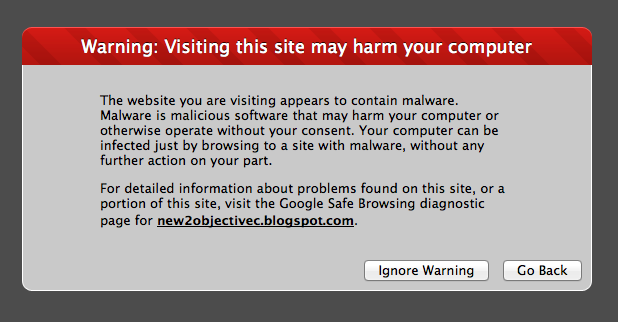
I was updating my blog last night and suddenly Safari pops up this message, WTF, my blog has malware??

Tried Firefox from a Windows PC and it reports the same thing too, strange...

Clicked on the "Google Safe Browsing diagnostic page" and it reports as below, something about "nachbaur.com" and "176.9.179.0", how could my blog has those craps?

Start up HttpFox on the Windows PC, and as below, strangely it indeed tried to load things from those 2 URLs, how can that be?

Checked page source, Ah ha! Found it! It's not me, it's the "blog list" thing I added to the left hand side of my blog so that it automatically picks up latest posts from other blogs. And guess who owns "nachbaur.com" ("iOS web developer's life in beta" blog)?

The site "iOS web developer's life in beta" belongs to "Michael Nachbaur", one of the "famous" indie developers who's the co-creator, and recently sold their popular game "Casey's Contraptions" (Note: now re-branded as "Amazing Alex") to "Rovio", the company that owns Angry Bird.

I guess if you are famous, the bad guys would certainly love to target you due to your popularity.

As shown below, Google marked his site as malware infected too.

As a temporary work around, I have removed the blog list and until blogger.com released some sort of fix, won't put that back for a while. Hay, the only function should only copy the "text" content of the latest post from those other blogs, why is your silly code copying all the malware and other related scripts too??!!

I have requested Google to remove my site from their cache, so looks like you won't be able to find this blog from Google for a while until the cache been updated. As most of my traffic were referred by Google, it's going to hit my hit rate quite badly..... Don't think there's anything I can do other than wait for Google crawler to pick up my blog again...

Also tried to contact Michael by twitter, hope he gets the msg and quickly fix it. 

Have to wait and see how it goes then... Wish me good luck...

[Update 20/06/2012]
Michael responded with twitter: 
"Thanks for the heads-up! WordPress sucks... I've reinstalled and cleaned it up. Thanks for the warning!"

So looks it's fixed on his blog. Michael asked for a review, instead of like me - request for the page to be removed from the Google cache. May be his way is better, as I can't find my blog in Google for 2 days now :-(... How long is it going to take to be added back to Google again??

[Update 29/06/2012]
Thanks for comment from Peter below, yes it's fixed after I manually use the Webmaster tool to add my site back to Google. The other option is like what Michael did, simply ask Google to review, it seems to be quicker?


Saturday, May 5, 2012

How to force OS X Preview 5.5.1 (719.16) to "refresh"?

I was using my iPad2 to capture some screen dumps from my App. But I found that when I tried to use Preview (Version 5.5.1 (719.16)  running on OS X 10.7.3) to "Import from iPad2", the displayed content never change even if I made quite a few changes on the device (new images been created or old ones been deleted). Which means the latest updated images can't be imported to my MacBook.

There must be a time-out or cache refresh interval period defined somewhere, but how long do I have to wait or how can I force it to refresh?

I tried disconnect the USB cable and reconnect again, still the same. Tried deleting some images from within Preview, still the same.

Very strange, and I can't find any function in Preview to force it to refresh/reload. Quite annoying, I guess the last option is to restart my MacBook Pro (Update: yes, restart did force it to refresh). But that's quite dumb if you have to reboot your Mac just to refresh Preview??

Any one got similar problem or have any idea how to fix this?

Tuesday, November 15, 2011

Malware detected in iphonedevsdk.com forum by chrome 14.0.835.202

I got a chrome session with iphonedevsdk.com forum left overnight, and this morning when I look at it, Chrome says "Warning: Something is not right here!" and the content talks about malware. The chrome version is 14.0.835.202, wonder if the forum admin guys aware of this, probably some sort of injection attack?