Showing posts with label troubleshooting skills. Show all posts

Wednesday, June 13, 2012

How to capture Exception while debugging

In Canberra today, doing training course (no, not iOS development related unfortunately :-P )....

Found this handy post from iPhone Development Blog as below talking about how to capture Exception while debugging. This would surely helps with all those weired exceptions!

Capture Exception While Debugging

Monday, April 9, 2012

Don't rotate or scale your touchable Sprite in Cocos2D,

Got stuck with a bug for almost 2 weeks.

What happened was, I tried to rotate and scale down some sprites. Problem is, I found that all the touchable Sprites which used to work perfectly before the rotate and scale down won't respond to touches that were around top or bottom 15-20% area of the Sprite. That is, users now have to tap at the middle of the Sprite - which is very very very annoying.

After all sort of troubleshooting, I finally worked out it's because of the Sprites I am using. Unfortunately, been a developer who's not very good with designing and graphic :-(, plus a bit lazy (sometimes). To avoid the hassle of redrawing all the Sprites, I simply used the built-in Cocos2D function to rotate and scale down all the Sprites and that is where all the problem began. Looks like if you rotate or scale down your Sprites, somehow Cocos2D won't respond to touches on the top/bottom 15-20% of the Sprite. My test shows if I supplied extra set of properly rotated/scaled images, then everything works as expected - mystery solved! But what a pain as I now need another set of Sprite! ^%#%#@#$@%

Only if Cocos2D is smart enough to adjust all the touch function properly according to the scale/rotation been made to the Sprites, is this qualified to file it as a new bug, or is it a "known feature"?

Well the good news is, for those Sprites that are not touchable, you can still rotate/scale them as required.

Saturday, March 10, 2012

Be ware of issue with Microsoft Word

Was following the example by Sean Berry on Ray Wenderlich's site about how to Localize an iPhone app, and found it quite interesting.

I was playing around with Google translate on my PC to translate a few text messages to Japanese. Urh... no, I don't understand anything about Japanese, so I got absolutely no idea what it says...

As Notepad can't copy those special characters, I just copy and paste it into a Microsoft Word document.

However, after I copied the file to Xcode on my Mac, I was then stuck with this strange error for a while: "Validation failed: The data couldn't be read because it has been corrupted." What the???!!!

I tried a few things (remove a few lines here and there) and finally confirmed it's something to do with these few lines... Then stared at it for a long time as I got no idea what those characters said...

Finally, I noticed the colour difference with the part as highlighted below. The ending semi-column should be in black colour, not red. Why? because bloody Microsoft Word converts the double quotes to special characters that Xcode can't recognise! ^$$@$%#^%%&*!

Sunday, January 22, 2012

How to track down iOS 5 bug?

There's this post from ios-blog.co.uk which talks about how to handle bugs that are specific to iOS 5 which you might find handy.

We had a similar issue the other day at work for a web based application which if the field type is set to "text", for customers using mobile safari browsers with iOS 5, strangely all leading zeros will be automatically truncated. Have to put in special code to detect browser version and then change the field type accordingly.

Saturday, November 12, 2011

Strange behaviour when method in "@selector" missed a parameter

I was reading and trying some of the code from this article (Cocos2D iphone tutorial: Die, Grossini, Die! – Part I) about some basic Cocos2D stuffs. One of the things I have is to create a clickable "Restart" text as below:

-(void)stateChange_gameOverDisplay {
    
    CCLOG(@"inside stateChange_gameOverDisplay");
    
    [CCMenuItemFont setFontName:@"Marker Felt"];
    [CCMenuItemFont setFontSize:30];
    CCMenuItem *play_menu = [CCMenuItemFont itemFromString:@"Restart" target:self selector:@selector(restartGame:)];
    
    CCMenu *menu =[CCMenu menuWithItems:play_menu,nil];
    menu.anchorPoint=ccp(0,0);
    menu.position = ccp(280, 20);
    [self addChild:menu];
    
    CCLOG(@"end of stateChange_gameOverDisplay");
    
}

But when I run the code, there's nothing been displayed and it just keep looping and looping as below:

inside stateChange_gameOverDisplay

It took me a long time to work out it's because when I specify the selector, there's an extra ":" behind the method name.

@selector(restartGame:)


But I declared the method incorrectly as below:

-(void)restartGame {
    CCLOG(@"inside restartGame");
    //do something here
}


The correct way should be as below, with the "(id) sender" parameter

-(void)restartGame: (id) sender {
    CCLOG(@"inside restartGame");
    //do something here
}

I guess it's probably because the "@selector" thing can't find the correct method to call? But as there's no error or warning, it might be a bit difficult to relate the symptom to the root cause...

Back in June, I wrote in this post about crash caused by missing ":", I guess this one is also similar, but from different angle, somehow.

So one more tips for everyone if you get similar strange behaviour like this...

Friday, October 28, 2011

Error "Sending 'ccColor4B' (aka 'struct_ccColor4B') to parameter of incompatible type 'CIColor *'"

While trying to compile some old Cocos2D projects, as attached, keep getting this error "Sending 'ccColor4B' (aka 'struct_ccColor4B') to parameter of incompatible type 'CIColor *'" in my Xcode 4.2

As below, the Cocos2D is version 0.99.01 according to "cocos2d.h". Looks like have to upgrade the Cocos2D in the project...

[UPDATE 16/01/2012]
I found the fix!

Instead of:


+ (id) layerWithColor:(ccColor4B)color
{
return [[[self alloc] initWithColor:color] autorelease];
}


The fix is to change it to as below, with the changed part highlighted and underlined.


+ (id) layerWithColor:(ccColor4B)color
{
return [[(CCColorLayer*)[self alloc] initWithColor:color] autorelease];
}


Note that this is for Cocos2D 0.99.x only, read on the net that it's renamed to "CCLayerColor" in later version.

Hope this helps!

Wednesday, October 26, 2011

Error "Illegal Configuration - Pattern colors on iOS versions prior to 3.0"

While looking at some old projects developed with Cocos2D from the net, found that the new Xcode 4.2 throws the following error: "Illegal Configuration - Pattern colors on iOS versions prior to 3.0" and refused to compile.


Checked the net and found this page from Mark Tomlinson's site which says "The error is due to incompatibilities with older nib/xib files prior to version 3.0". It also mentioned about the fix is to "change the **Deployment** type in the *Interface Builder Document* settings", however the image no longer exist so I got no idea what he is talking about.

It took me a while and I finally found it. You have to select the nib/xib file, then at the right hand side, as shown below, under "Document Versioning" there's this drop down called "Deployment" and the current selected option is "iOS 2.0", just change it to the current version "iOS 5.0" (or anything above 3.0) then it works.

Wednesday, September 21, 2011

Error "EXC_BAD_ACCESS" fixed by adding "retain" to NSString

Was working on my next project and for some unknown reason, during the main loop it will work perfectly on 1st round, but then always crashed with this strange "EXC_BAD_ACCESS" error which I never seen before. Sometimes it shows this screen full of assembly languages as shown below.

Sometimes it's like this:

Tried lots of different things, like restructuring the classes, moving methods up and down the hierarchy, add lots of NSLog and checking object allocation/deallocation, check for memory leak in Instruments...etc.

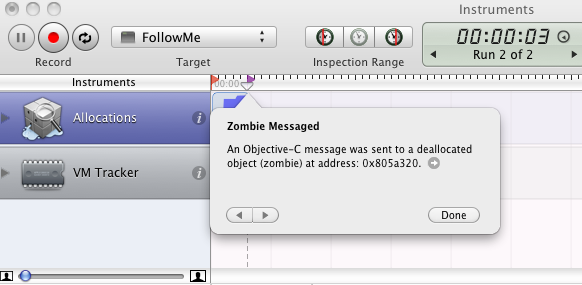
Search on the net (see this one for example) and learned that the error is more about trying to call method of a object that's already deleted, not the memory leak. Have to use "Enable NSZombie detection" as shown below to check.

And I got it straight away!

After a while finally worked out that I was incorrectly doing something like this;

recordOfComputersMove = [recordOfComputersMove stringByAppendingFormat:@"%@%i",kStringSeparater,curEmptySpot];


which should actually be like this, adding the "retain" at the back fixed the problem.

recordOfComputersMove = [[recordOfComputersMove stringByAppendingFormat:@"%@%i",kStringSeparater,curEmptySpot] retain];


while working on the issue, I also read a few articles talking about this thing called "Enable Guard Malloc" (see here and here), and it took me a while to find out how to do it in XCode 4 (see here) as shown below inside "Edit Scheme".

However I think I don't understand how to use it "properly" yet as after it's been enabled, all I can see is this message as shown below, saying "stack log" been created in this file. But when I tried to open that file, it's in some sort of special format which I can't find a proper reader/editor to interpret it into a readable way.

Well, I guess most important thing for me is to identify the problem and work out a fix. That "Guard Malloc" way is definitely a bit too advanced for my level I guess...

Yeah, feels good to learn new things every day!

Monday, September 19, 2011

Error "Undefined symbols for architecture i386: _OBJC_CLASS_$_AVAudioPlayer referenced from: objc-class-ref"

Was away on holiday last week. Of course I brought my MacBook Pro with me. Unfortunately there's no Internet access, which is extremely painful...

I was playing around with the Core Animation Demo by Bob McCune and created this very simple sound testing project.
But whenever I tried to compile the project, as below it kept showing this error:
Undefined symbols for architecture i386: _OBJC_CLASS_$_AVAudioPlayer referenced from: objc-class-ref
And without Internet Access I was stuck for the whole week, biting my finger nails, scratching my head, searched through every PDF I have but couldn't workout anything. I wonder was that something Apple put in to encourage developers to sign in to the developer program??

When I finally got Internet today I quickly searched the net and found quite a few people having same issue. I found this post from stackoverflow most relevant. So it's my fault, I didn't add the AVFoundation framework!! Simple as that, but without the Internet I would never be able to work that out for sure as I never seen that error before.

Next question then is how to do that in Xcode 4?

As shown below, click on "TARGETS" in the middle panel, then click on the "Build Phases", expand the "Link Binary With Libraries", then click the "+" sign.

After added the AVFoundation framework it works like a charm!

I love the feeling when I learned new things or fixed some annoying problems!

Saturday, July 16, 2011

Sometimes, don't listen to the compiler

Was testing this "colour picker" code from http://www.skylarcantu.com/blog/2009/08/14/custom-uialertview-color-chooser/. As below, compiler gave me warning about "Using the result of an assignment as a condition without parenthesis". The suggestion is "use '==' to turn this assignment into an equality comparison" and "Place parentheses around the assignment to silence this warning".

I followed that and then noticed....wait...that's not right!

The author was actually combining the following 2 lines:


    self = [super initWithFrame];
    if (self) {
        

into 1 line:


    if (self=[super initWithFrame:frame]) {


If I use "==" instead of "=" as suggested, that would be wrong! So I guess sometimes we shouldn't listen to the compiler...

Wednesday, July 13, 2011

Strange XCode error when switching between XCode 3 and 4 - fixed

I have a machine at home running XCode 4 and a VMware virtual machine on my laptop running XCode 3. When I have to load the projects on different version on XCode, it gives me some strange error.

Opening XCode 4 saved projects on XCode 3 is easy, just change the "Project Properties" and choose the correct SDK.

But when I tried to open XCode 3 saved projects on XCode 4, as below it gives me tones of error "LLVM GCC 4.2 Error" "Operator '<' has no left operand", and the file that got those error is "usr/include/AvailabilityInternal.h" which I never heard of...
Took me a while to work out the fix. As shown below, I have to change the "Base SDK" to "Latest iOS(iOs 4.3)" and then it start working...

Tuesday, July 12, 2011

How to print BOOL in NSLog

Was trying various ways to dump the value of a BOOL in NSLog for debugging and couldn't get it to work properly. Did a quick search on the net and quickly found the solution as below, just convert it into a NSString!


NSLog(@"isTwoPlayerMode=%@", ([currentGameData isTwoPlayerMode] ? @"YES" : @"NO"));

Tuesday, June 28, 2011

Crash caused by missing ":"

Was testing an array of buttons all using the same "buttonPressed" method to handle the click action, and based on tag value to work out which button been clicked. It keep crashing whenever I clicked any of the buttons and couldn't work out why.


    UIButton *button;
    
    [self createNormalButton: button 
                      atPosX: locX
                      atPosY: locY 
                   withWidth: widthValue
                  withHeight: heightValue  
                 withBGColor: [UIColor clearColor
              withTitleColor: [UIColor clearColor
                     withTag: tagValue 
                   withTitle@""
                  withSelfIDself 
                withActionID@selector(buttonPressed)
                   ifEnabledYES
                      inViewself.view];


- (IBAction) buttonPressed: (id) sender
{
    
    int whichButton;
    
    whichButton = (int) ((UIButton *)sender).tag;
    
    NSLog(@"Clicked button tag=%d",whichButton);
}


The error message is as below:


2011-06-28 23:35:57.374 NoNIBTest1[1758:207] -[TestBedViewController buttonPressed]: unrecognized selector sent to instance 0x4e07340
2011-06-28 23:35:57.377 NoNIBTest1[1758:207] *** Terminating app due to uncaught exception 'NSInvalidArgumentException', reason: '-[TestBedViewController buttonPressed]: unrecognized selector sent to instance 0x4e07340'


Took me a while to realise because this "buttonPressed" method is now accepting/expecting an extra parameter "(id) sender", I have to add an extra ":" at the end when passing the selector ID for action.

So it should be "@selector(buttonPressed:)" with the extra ":" at the end. Quite strange compared to what I learned before in other programming languages.


    UIButton *button;
    
    [self createNormalButton: button 
                      atPosX: locX
                      atPosY: locY 
                   withWidth: widthValue
                  withHeight: heightValue  
                 withBGColor: [UIColor clearColor
              withTitleColor: [UIColor clearColor
                     withTag: tagValue 
                   withTitle: @""
                  withSelfID: self 
                withActionID: @selector(buttonPressed:)
                   ifEnabled: YES
                      inViewself.view];


Saturday, June 25, 2011

I accidentally deleted my whole book sample code folder!

I have a folder on my desktop called "books.code" where I put all the book sample codes downloaded from net.


Today I tried to add some existing image files from an example code, but accidentally selected the "books.code" folder while navigating down the path. It took a while for XCode to add it - as it "faithfully" added the whole folder. Well, I just as usual, click the folder in XCode and delete. Then I noticed SHIT! It's deleting the whole book sample code folder WTF!.....

Shouldn't the default behaviour for adding external file be "create an extra copy" ??!!

Any way, has to be more careful with "delete" and adding external file next time.