Showing posts with label open source game. Show all posts

Monday, April 16, 2012

Cocos2dDiceInCup Minor Update

I made some minor update to the "Cocos2dDiceInCup" game, mainly updating the images to proper Cup and Dice (instead of the ugly "rock" and "seeker" previously). Otherwise everything remain the same, still under MIT license. And I promise I will be "very happy" to see if any one copied my code this time, just if you can kindly let me know or provide a link back to this blog. Thanks!

Updated Link for Cocos2dDiceInCupVer1.1.zip

Thursday, March 1, 2012

Insurgent Games released all their games as open source!

In case you are not aware, Insurgent Games kindly released all their games as open source. Further info available in this link.

Would another good source to learn new techniques as some of them used GameSalad and some used Cocos2D-iPhone.

It's sad but true as they mentioned -
For a couple of years they happily made iPhone and Android games. They quickly realized that unless you’re incredibly lucky, it’s hard to make enough money developing indie mobile games to pay San Francisco rent. So Micah got a full time job and Crystal moved on to other things.

Looks like being a full time indie developer and make a living out of it is indeed not a simple thing...

Thursday, February 9, 2012

Someone copied my game!

Last September, I wrote in this post about someone who copied the "ABC123" open source game, changed the background colour plus a few minor stuffs, and then publish the whole game as his. Today, I found it happened to me too!!!

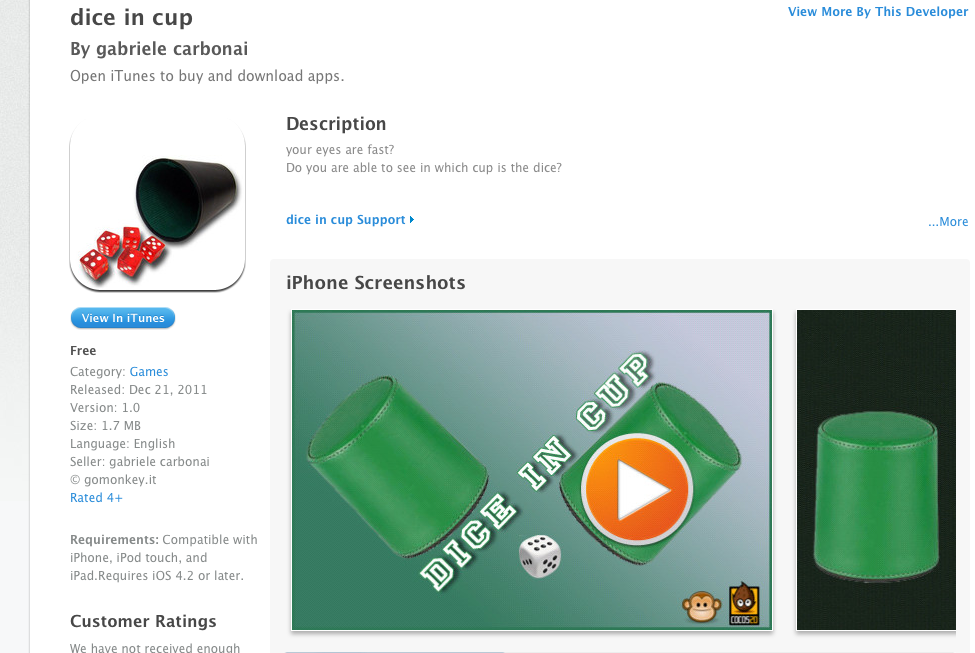
I first noticed this "Dice in Cup" game a few days ago, as below, it's published on 21st Dec 2011.
I played with it for a while and noticed strong similarity with my "Dice in Cup" open source game published on 15th November 2011. If you look at the screen dump below and compare with the video I posted in this post, you will notice other than the image difference, the font, the label, the location of the label, even the points you gain after passing each level is exactly the same!
Even the name of app after installed, the one to the left is his, the one to the right is mine, is exactly the same! There's a few "..." in the middle because I called my game a very long name: "Cocos2dDiceInCup":

To further clarify, I use the method I mentioned in this post to inspect the ".ipa" file after sync with a Windows machine. As shown below, the name is indeed "Cocos2dDiceInCup"!
After renamed it to ".zip" and expanded, the content is shown below, although he did add quite a few image/music/sound files, he didn't even delete my 2 old image files: "rockImage.png" and "seeker.png"!
As shown below from my published source, those 2 image files are there.

Ok, so based on my investigation, this guy copied my whole game, added some sound and music, added a background image, changed the cup/dice image and added a starting page.

[Update 10/02/2012] After some further study, looks like I have to admit I didn't have enough understanding of Open Source at the beginning.

My main purpose of sharing was simply to help others to learn - like so many others who have helped me in the past. And I naively thought that everyone will have similar thinking - to appreciate others' generosity, to respect others' intellectual property, and also somehow contribute back to the community to make it even better.

Unfortunately, there's always some people who would simply tastelessly copy everything and then publish it without giving any credit to the original creator. This really hurts my feeling, and I will certainly think twice before publishing anything... Sad... :-(

[Update 11/04/2012] This issue has been on my mind for a while. After calmed down a bit, I think it's me who is the silly one - who didn't fully understand the meaning of Open Source at the beginning, then probably felt hurt as others published something before me using my code (I still haven't publish anything yet :-( ...), thus came up with all these negative stuffs.

But hey, that's Open Source! You suppose to feel proud that someone did copy your stuff as that would be some sort of "recognition"!

My apology if my negative feeling caused any confusion or hurt any one. Was thinking of deleting this/previous post, but on second thought, decide to leave it as a reminder - to show what sort of dumb mistake I have made - released code as Open Source and then criticise others for copying it.... Silly me...

Monday, November 14, 2011

5th Open Source Game (1st in Cocos2D) - Dice in Cup

Finally got 5th Open Source Game (1st in Cocos2D) "Dice in Cup" all done (or in other words - sick of working with it and wants to start another new one :-) ). The source link is at the end of this post.

As I mentioned before, I purposely picked this simple game idea to have a chance to get familiar with Cocos2D.

A high level flow of the game from code's point of view is as below:

1. Game first started, "init" calls "initialiseGameVariables" which set "GameState" to "kGameStateStarted"

2. "init" creates all cup/seeker objects, call "moveCupToRevealObject"

3. end of "moveCupToRevealObject" will call either "stateChange_startGame" or "stateChange_gameOverDisplay" depending on "GameState"

4. "stateChange_startGame" will reset all cups initial position, set "GameState" to "kGameStateMoveCups" then call "MoveCups"

5. "MoveCups" will move cups around, at the end of all cup move, calls "stateChange_CupMoveCompleted"

6. "stateChange_CupMoveCompleted" set "GameState" to "kGameStateUserActionStart"

7. after user clicked something, "observeValueForKeyPath" will set "GameState" to either "kGameStateIncorrectChoice" or "kGameStateCorrectChoice"

===== incorrect move

8. in "scheduleControl, if "GameState" is "kGameStateIncorrectChoice", it calls "moveCupToRevealObject", which same as #3 above at the end calls "stateChange_gameOverDisplay"

9. in "stateChange_gameOverDisplay", "Restart" been shown, wait for user click restart (calls "restartGame"

10. in restartGame", remove "Restart", then call "moveCupTorevealObject" and "initialiseGameVariables"

===== correct move

11. in "scheduleControl" if "GameState" is "kGameStateCorrectChoice", it updates score/level and then sets "GameState" to "kGameStateMoveOnToNextLevel"

12. also in "scheduleControl", it calls "updateDelayAndMoveNumber" and then sets "GameState" to "kGameStateStarted" - which then starts new level and repeats from #4 above

Did I confuse you? Hope not... I believe there should be other better/cleaner ways to handle the game logic, this is what I got so far. Welcomed to let me know if you got better ideas!

Also tested in iPad simulator, as below, might need to made some adjustment with the sprite size, other than that, it works perfectly.

A few other notes:
a. Same as previous game I used KVO to "observe" the correct/incorrect moves.
b. Tested rotation and Cocos2D handles that quite well, no extra code required.
c. Tested for memory leak in both Instrument 4.0 and 4.2, no leaking found.
d. Two places which I got stuck and spent most of the time is (1) the game state change which control the flow logic and (2) how to move the cups using the actions. As the CCSequence was mainly for running multiple actions on one Sprite, I end up creating 3 of them - one each! Let me know if you can think of better ideas!
e. As the main purpose of this exercise is just as a warm-up, to get familiar with Cocos2D, didn't try other stuffs like music/sound effect, menu, ...etc, will try to cover that in future projects.

Let me know if you found any problem with the code and hope you find this post interesting. Why not try one yourself and share it with everyone your better ideas!

Source for Dice in Cup V1.0

Sunday, November 13, 2011

Almost ready - 5th Open Source Game (1st in Cocos2D) "Dice in Cup"

Sort of "almost" finished my 5th Open Source Game (1st in Cocos2D), still working on code tidying at the moment - hopefully this won't break the code :-)...

Although I called it "Dice in Cup" - which is what I first intended to do - it now looks quite different. The "Dice" is now actually the "Seeker" image from Cocos2D, and the "Cup" is actually a ugly green rock image I created in Inkscape in 5 minutes.

It's a very simple game and everyone can easily understand it within seconds. Though it's quite slow and simple at the beginning, when you reached level 9 and above, the cups move really fast and it's quite difficult following it to work out which is the right one.

I purposely picked this game as my first Cocos2D game project and the result was quite good. I now have a better idea of how all the powerful "actions" works. Was stuck with the "Cup" moving logic and the game logic for a while. Although still not 100% clear on how some of the schedule and CCSprite class stuffs work yet, after this project I felt a bit more confident in dealing with it now.

Uploaded a short demo on YouTube as below.


Hopefully can finalise all the work in the next few days and will let you know when it's all completed!

Wednesday, October 12, 2011

4th Open Source Game - Follow Me If You Can

After a few weeks hard work, I am please to announce my 4th Open Source game - "Follow Me If You Can" - released in MIT license.

It's a very simple memory game: the computer moves some tiles around and you have to remember all the moves. As when it's your turn you have to repeat it. You get points for every correct move, extra bonus and life if all correct. You loose life for every incorrect move - but the correct move will be shown as hint.

Some screen dumps as below:


Features:
1. My first project to have background music and sound effect (applause for every level that's completed with no mistake)
2. Start up menu and game over menu
3. Keeps top 10 scores, options to view from both start up and game over menu
4. Simple tutorial/how to play screen using a scrollview
5. First project to use KVO - for displaying hint after any incorrect move
6. The number of tiles for the width/height increases every 2 levels
7. The number of moves increases every level
8. To make it not too difficult, the game starts with 5 lives, and you get bonus life for every level that's completed with no mistake
9. Handles rotation

I have also create a short demo video on YouTube as below to show you how it works.


I first read about KVO from "Back to Basics: Using KCO" by Mike Nachbaur, thought it's a pretty cool idea. Unfortunately most of the game already completed, so in the end only use it for displaying the hint when user made a mistake. Will surely try to use it more frequently in future projects.

As the Instrument 4.1 on OS X 10.7 Lion problem still not resolved yet, I can only test my code on the 10.6.7 box in Instrument 4.0 and it passed without any memory leak or zombie problem.

The background image is from defcon-x and I like to thank him/her for scanning all the different wood textures and provide it for free.

The images are from Microsoft Office for Mac 2011.

As I am starting to learn Cocos2D, not sure if I will create any more "pure objective-c" games like this. Let's hope Cocos2D is as good as the others claimed - as that's why it's so popular?

Hope you enjoy the game and can learn something from the code, let me know if need any further information or found any bug.

Happy coding!

Link to Source Code for Follow Me If You Can Ver 1.00

Sunday, October 9, 2011

Expect to finish 4th Open Source Game this week

My 4th open source game almost ready. This time I added music, first attempt on KVO, start up/ending menu, a simple scrollable "how to play" view, top scores, ...etc. So far, the most complicated open source game I ever created...

Expect to release it before end of this week...

Saturday, September 24, 2011

Wolfenstein 3D for iPhone Ver 1.0 working on Simulator

Yeah! I finally got "Wolfenstein 3D for iPhone" Ver 1.0 working on iPhone Simulator, and the sound works too, pretty cool!

Note: have to disable "GLimp_AppActivate( active );" and "GLimp_Shutdown();" in "opengl_main.c" to allow it to compile and run on Simulator. Read on the net that you only need those files when you are running/compiling it for the actual device.


Also read this article by Fabien Sanglard which provides some info about the code. But as I know nothing about Open GL yet, so it's still too advanced for my level. I can only work out that the NSTimer is in the EAGLView.m part, and have absolutely no idea about the rest :-( ...

And no, unfortunately I can't get the V2.1 version work yet as there's tones of image files missing...

Any way, this is sufficient to keep me occupied for a while and relax a bit before diving back to my unfinished Open Source Game #4... still got quite a lot of bugs to fix...

Stop killing open source!!

Noticed this game called "Bubble Explosion" almost identical to ABC123 - sequence in App Store. It was originally selling for $1.99, now reduced to free.

Alright, to be fair, this guy did change the background colour from green to blue, the front menu, and when the game starts, the background bubble image wasn't displayed.

Other than those mentioned above, everything is identical. Yes, even the font, the bubble image, the labels, the messages, everything...

I guess that's where all those copyright/legal licensing thing comes in. The web site of ABC123 probably hasn't been updated for a while. Info about sharing source code by author Jedidiah Laudenslayer in 2008 is available here but it no longer works). So can't really tell what info did the author put in there as I don't have a copy.

It's always quite encouraging to see so many developers sharing their knowledge and willing to help others on the net. However this kind of lazy, disgraced behaviour makes me sad.

Even though I haven't publish any app in the App Store yet, I would be really really mad if this happened to any of my published open sourced apps.

I think it's time to review my "Take your kids, family or love ones for a few hours of outdoor activities license". And probably only release source code of any published open source game after at least 6 months after published. Please let me know if you have any other idea...

[Update 11/04/2012] This issue has been on my mind for a while. After calmed down a bit, I think it's me who is the silly one - who didn't fully understand the meaning of Open Source at the beginning, then probably felt hurt as others published something before me using my code (I still haven't publish anything yet :-( ...), thus came up with all these negative stuffs.

But hey, that's Open Source! You suppose to feel proud that someone did copy your stuff as that would be some sort of "recognition"!

My apology if my negative feeling caused any confusion or hurt any one. Was thinking of deleting this/other post, but on second thought, decide to leave it as a reminder - to show what sort of dumb mistake I have made - released code as Open Source and then criticise others for copying it.... Silly me...

Monday, September 5, 2011

3rd Open Source Game - Memorise Me If You Can!!

As mentioned in previous post, I finally got the whole game working, and tested/approved by my 10 years old "iPhone game testing" specialist.

I decided to call it "Memorise Me If You Can !!" The game is based on ABC123 and it's so simple that it shouldn't require any further explanation. I have posted this short demo video on YouTube:


I have added quite a few features to make it more interesting and easy to play, I think any one can at least easily reach level 10.

I learned from playing the popular game "Tiny Tower" that when the score gets updated, by moving it down and then back quickly, it catches player's attention due to the movement. I quite like it so I also added this feature to the game.

Some of the things different (extra!) from ABC123 as below:
  1. handles rotation (portrait upside down)
  2. shows count-down before each level
  3. count-down time increased every 2 levels to make the game challenging but still achievable
  4. change background image every level to make it more interesting
    1.     Note:       There's this last minute change to this part of code (the 2nd internal if loop) which now changes it to change background image every level. Originally it was only to change at "every 2 levels". Can easily change it back by enabling the internal if loop.
                  //change background colour every 2nd level if not 1st start
                  if ((curGameData.prevGameState != -1)) {
                      
                      //if (isCurrentTurnNumberNotChar) {
                          self.view.backgroundColor = [self getNextBackgroundColor:kDontUseDefaultBackGroundImage];
                      //}
                  }
    2. display current level
    3. added visual effect to shake/move score/life/level value
    4. use faded effect for all display message to maintain clean interface
    5. added simple info about how to play at the bottom of the screen during count-down
    6. didn't add menus at beginning of game
    7. like the previous ball bouncing game, keeps track of top score


    A few screen dumps as below:

    I can also think of quite a few extra stuffs for future enhancements:

    1. Might need some more refactoring, as I didn't spend lots of time in planning the object/file separations. Lots of the codes in the view controller might be able to be further separated to make it cleaner
    2. May be a more challenging "reverse order" every 5 levels to make it more interesting?
    3. May be a menu at the beginning with a simple tutorial/how to play?
    4. currently timer set to 1 sec, may be can make it smaller to make it more responsive. As now everything has to wait for 1 sec before the timer kicks in next check. But this might make the count-down part more complicate.
    5. MUSIC and SOUND EFFECT! This is still my weakest point as I am still using the simulator. Hopefully can start testing on real device soon.


    Code structure wise, it's quite simple, other than main and AppDelegate, there's:

    1. UIViewController => for View Controller 
    2. BubbleObj => UIView class for all the bubbles. Yes it's not in round shape but I still call it bubble, the image is from previous "glass button generator" project 
    3. GameData => to hold game related data 
    4. ScoreLifeObj => to hold score, life, level data 
    5. SharedUtilities => for utilities that shows the count down, shakes the label, shows messages that fade away in a few seconds time, ...etc 


    Game control logic wise, still follows the same game looping method learned from ball bouncing game. Using 2 int variable to keep track of current and previous game state, then calls different methods accordingly. Top score tracking is done using application preference.

    I have also tested the game in "Instruments" and found no memory leaks.

    Hope you find the game interesting, let you know if you found any bug or got any questions.

    Source code of the "Memorise Me If You Can" Game project

    Thursday, September 1, 2011

    Working on another game similar to "ABC123"

    There's this very old post on iPhoneDevSDK site in 2009 which "kwigbo" announced about publishing full source code for his "ABC123" cocos2d game. Unfortunately that link no long works and I wasn't able to find any source code on his site either.

    Based on the same idea, I am currently working on "my implementation" of a game similar to "ABC123". I haven't learn COCOS2D yet, so all in basic iPhone code.

    Already finished the logic, display and other stuffs. Only got a few things left like showing/keeping the score, showing how many "tries", ...etc. Hopefully can get it completed within the next few days.

    Will keep you posted.

    Sunday, August 14, 2011

    Open Source Game: Simple Ball Bouncing Game Ver 2

    I expanded the simple ball bouncing game a bit. It now has a few more functions:
    -added game pause function
    -added left/right direction movement, toggle between up/left-right movement with direction button
    -starts with 1 ball, get extra ball every 100 points (max 5 balls)
    -added device rotation handling
    -added top score recording using application preference

    A simple video of the game is below:


    Also learned some new skills, this is my first project with proper device rotation handling (using empty NIB design as the NIB-less design still have problem with rotation handling), and also my first project with saving data in application preference.

    For example: I was following the instructions from chapter 7 of "Beginning iOS 4 application Development" for device rotation handling. But found that if I use "willAnimateSecondHalfOfRotationFromInterfaceOrientation" I keep getting this strange message shown below and the program will stop after running for a while: "Using two-stage rotation animation. To use the smoother single-stage animation, this application must remove two-stage method implementations."

    Don't know what the hell is "two-stage rotation animation", but after a few searches on the net, I fixed it by replacing the "willAnimateSecondHalfOfRotationFromInterfaceOrientation" function with "willAnimateRotationToInterfaceOrientation".

    The source code available here

    Thursday, August 11, 2011

    Open Source Game: Simple Ball Bouncing Game

    Based on YouTube video http://www.youtube.com/watch?v=iGwZoowB-6Y&feature=related by TheEagle1100, I learned quite a lot of new things and created this new simple ball bouncing game: the timer, the game state, the way to move the balls, move the platform down, setup the scores, ...etc.

    As shown in screen dump below, there's a few balls bouncing up and down, getting scores on every bounce. When the balls bounced above top 1/4 of the screen, the green platforms moved down and more new ones appeared at the top.

    Due to the problem with the NIB-less template I used before - which wouldn't rotate properly, I now use an "empty" NIB, finally it rotates as expected this time.

    Instead of 1 single ball and 5 hard coded IBOutlet in the YouTube video, in my project both the platforms and balls are defined using arrays, and you can freely adjust the parameters to get more platforms or/and balls. The NIB was left empty and all UIImageView, UIButton, UILabel objects were added by code.

    In the YouTube video (not this one but part 8 or 9? can't remember), TheEagle1100 also demonstrated how to setup the code to control the ball movement in the real device by tilting it around. Unfortunately I only have the simulator, so that part wasn't included.

    I also removed the menu and changed the ending part with a button. Hope you find it interesting.


    Source to double simple game

    Wednesday, July 13, 2011

    TicTacToe V2.1 leaking fixed

    Ok, spent some time today playing around "instruments" and browsing the net learning how to fix memory leak. I think it should be fixed now, as when I re-run "instruments" the result is as shown below, there's no more leaking! Yeah!

    Most of the issues are related to NSString handling. If you compare the V2.1 with V2.0 and you will easily see the differences.

    Alright, spent enough time on TicTacToe, time to move on to the next project....

    Source Code for TicTacToe V2.1 (Leaking Fixed)

    Tuesday, July 12, 2011

    Open Source Game: TicTacToe Ver 2.00

    After about a week's hard work, I finally merged TicTacToe Ver 1 with the multi-view switching project and created a updated version of TicTacToe called Ver 2.00 which has multiple view controllers. Some high level information as below.

    1. Instead of "everything in single main.m file" as in Ver 1, Ver 2 is splited into different files.
    2. There are total of 4 View Controllers. The main one only in charge of switching between the 3 child view controllers. The 3 child view controllers are Intro, GamePlay and Ending. Each looks after different parts of the game. 
    3. Added 3 different difficulty levels for single player mode: beginner, advanced and expert. In beginner mode, computer will always play randomly. Advanced mode is with the 2 special conditions disabled. Expert mode has those conditions included. 
    4. Intro View Controller looks after collect info about single/two player mode and the 3 difficulty levels.
    5. GamePlay View Controller mostly remain unchanged from Ver 1 except now it highlights the winning row at the end.
    6. Ending View Controller shows the final score/result, and ask player to choose whether try again or start a new game.
    7. Also created a new class "GameData" to store all game related data. This isolates the game logic and data, plus makes it easier to handle the data, in case say need to export/store the data into file system or whatever other purpose.
    Another thing I learned, was to always use "@class xxxxclassname" in ".h" header files to reference other classes, only use "#import" in the ".m" files to avoid looping declaration errors.

    Original plan was to use this as practice and build a simple multi-view template/platform so that I can further expand it into more complicate projects in the future.

    However, I felt like been punched on the face after I did a quick run using "Instruments". As shown below it's leaking memory quite badly - see the purple little bars on top of the screen.

    Don't have much knowledge about how to use "Instruments" to work out which part is leaking yet, so there's surely still a lot of things to learn before I can build more complicate stuffs.

    Any way, if any of you still interested in the "leaky" TicTacToe V2", the link is below.

    [UPDATE 2] Please see this post for TicTacToe V2.1 (Memory Leak Fixed)

    TicTacToeV2

    Sunday, July 3, 2011

    Open Source Game: TicTacToe Ver 1.00

    Finally got ver 1.00 of my first game - TicTacToe completed. As usual, it's a NIB-less design. I have put everything in one "main.m" but it shouldn't be too difficult for you to split into separate files if required.

    Link to full source code listed below, I tried to make the code looks tidy and put in as many comments as possible within limited time. Drop me some comments on the blog or email me if you need any further info.

    Well, actually the 2 players mode has been fully working for a few days. It's just that in the single player mode, computer player wasn't "smart" enough until now.


    Some information about the game:
    1) I use "buttons" instead of "touch" events like the others
    2) Originally I used NSMutableArray for "gameArray" (to store board status) and "checkWinArray" (to check each of the 8 possible winning conditions), but wasn't very comfortable about it. In the end both switched back to use simple arrays.
    3) Original plan was to show a separate view for users to pick single/two player mode, but couldn't get it to work, so just use the UIAlertView.

    Known issues/limitation:
    1) Doesn't support device rotation "yet" --> will fix that later if I can find some time
    2) Won't save application status if interrupted --> will fix that later if I can find some time
    3) No music/sound --> I have to admit that I have read some examples from books/net about how to play music, but haven't actually try any, this will be for future versions.

    I am not very sure if there's any memory leak as I am still not experienced with it, please let me know if you found any!! Please also kindly let me know if you found any bug or problem with it.

    Oh yes, one more very important thing: So far, I wasn't able to beat the computer player in single player mode. Let me know if any of you can find a way to win her!!!

    Enjoy!

    [UPDATE 1] Please see this post for TicTacToe V2.00
    [UPDATE 2] Please see this post for TicTacToe V2.1 (Memory Leak Fixed)

    Note: I quite like the "Take a kid fishing or hunting license" by Nicholas Vellios (http://www.vellios.com). To make it easier for people living in big cities like me, I slightly modified a bit and call it "Take your kids, family or love ones for a few hours of outdoor activity license"...ha ha...
    Source Code for TicTacTow Ver 1.00 (Updated)