Showing posts with label resource. Show all posts

Saturday, October 1, 2011

Started learning Cocos2D

Just started learning Cocos2D with the Learning Cocos2D book.

Currently halfway through chapter 1 and already found a few issues:
(1) "HelloWorldScene.m" should be "HelloWorldLayer.m"
(2) The new code to add the space cargo ship image should be "under" the existing Hello World label code inside "init()" so that the previously declared variable "size" won't cause compiler error.

The forum for the book is also not as organised as the others I have seen - which organised the questions into different chapters to make it easier for readers to find what they want instead of using search.

Any way, so far so good. Let's wait and see how it goes...

Friday, September 30, 2011

Not that easy to create a "flight control" type game as first thought

I was reading this article by Mike Nachbaur which was quite amazing. From short video below you can see the car running on the track.

Demo Video:


This reminds me of the Starter Kit - Line Drawing Game and thought I can just extend the idea a bit and create some sort of prototype quickly. As looks like the only difference is: Mike's demo has the race track hard coded. All I have to do is merge it with some "touch" code, right?

Wrong! May be it's just I am not up to that level yet, as after a few tests, it's definitely not as easy as I first thought!

At first, spent some time studying "bezier curve" as Mike's code used lots of those curves to draw the race track. Later realise it's not required as can achieve same result using straight lines.

Also did some research and found a few other resources on the net, specially this article which talks about setting up the path in touchesBegan and touchesMoved.

With the following code, I was able to freely draw some line and make the car follow the path (Note: car image from Mike's project). Sounds like a good start?

-(void)touchesBegan:(NSSet *)touches withEvent:(UIEvent *)event {
    UITouch *touch = [touches anyObject];
    if (touch) {
        thePath = CGPathCreateMutable();
        CGPoint tapPoint = [touch locationInView:self.view];
        CGPathMoveToPoint(thePath, NULL, tapPoint.x, tapPoint.y);
    }
}

-(void)touchesMoved:(NSSet *)touches withEvent:(UIEvent *)event {
    UITouch *touch = [touches anyObject];
    if (touch) {
        CGPoint tapPoint = [touch locationInView:self.view];
        CGPathAddLineToPoint(thePath, NULL, tapPoint.x, tapPoint.y);   
    }
}

-(void)touchesEnded:(NSSet *)touches withEvent:(UIEvent *)event {
    
    CAShapeLayer *centerline = [CAShapeLayer layer];
centerline.path = thePath;
centerline.strokeColor = [UIColor whiteColor].CGColor;
centerline.fillColor = [UIColor clearColor].CGColor;
centerline.lineWidth = 2.0;
centerline.lineDashPattern = [NSArray arrayWithObjects:[NSNumber numberWithInt:6], [NSNumber numberWithInt:2], nil];
[self.view.layer addSublayer:centerline];
    
    CALayer *car = [CALayer layer];
car.bounds = CGRectMake(0, 0, 44.0, 20.0);
car.position = CGPointMake(0, 0);
car.contents = (id)([UIImage imageNamed:@"carmodel.png"].CGImage);
[self.view.layer addSublayer:car];
    
CAKeyframeAnimation *anim = [CAKeyframeAnimation animationWithKeyPath:@"position"];
anim.path = thePath;
anim.rotationMode = kCAAnimationRotateAuto;
anim.repeatCount = 1;
anim.duration = 5;
    anim.removedOnCompletion = YES;
    anim.calculationMode = kCAAnimationPaced; // For constant velocity animation along the path
    
[car addAnimation:anim forKey:@"race"];
    
    CGPathRelease(thePath);
    thePath=nil;
}

Demo of my test project:


However after that I found quite a few problems. For example: using CAKeyframeAnimation you can only specify a "duration" for it to finish running through the whole path. As the path length changes all the time, it's impossible to control that. So if the user draws a longer path, it will run in faster speed...

Also found that when the image is moving as part of CAKeyframeAnimation, you can't "touch" or "move" it any more until the animation ends!

So, based on what I found so far, it's not that easy at all!

Monday, September 26, 2011

How many lines of code required to play an Audio file?

While looking at codes required to play an audio file, I found huge differences between different books/resources.

In the book iOS 4 Programming Cookbook, it talks about:

1. Adding " <AVAudioPlayerDelegate> " to the .h file of the ViewController
2. Create 2 methods:
- (void)audioPlayerDidFinishPlaying:(AVAudioPlayer *)player successfully:(BOOL)flag;
- (void) startPlayingAudio;

3. in viewDidUnload, you have to do the following:

    if (self.audioPlayer != nil) {
        if([self.audioPlayer isPlaying] == YES){
            [self.audioPlayer stop];
        }
        self.audioPlayer = nil;
    }


Wow,  that is quite a lot of work/code just to play an Audio file.

So far, the best I got are the following 2, which is quite similar:
1st one is from iOS Recipes: Tips and Tricks for Awesome iPhone and iPad Apps. The code is as below:

    NSURL *url = [NSURL fileURLWithPath:
                  [NSString stringWithFormat:@"%@/correct01.caf", 
  [[NSBundle mainBundle] resourcePath]]];
NSError *error;
audioPlayer = [[AVAudioPlayer alloc] 
                   initWithContentsOfURL:url error:&error];
audioPlayer.numberOfLoops = -1;
[audioPlayer play];


2nd one is from the the Core Animation Demo by Bob McCune I mentioned before:


    NSString *soundFilePath = [[NSBundle mainBundle]
                               pathForResource:@"correct01" ofType:@"caf"];
    NSURL *fileURL = [[NSURL alloc] initFileURLWithPath:soundFilePath];
    AVAudioPlayer *audioPlayer =
    [[AVAudioPlayer alloc] initWithContentsOfURL:fileURL
                                           error:nil];
    [fileURL release]; 
    audioPlayer.numberOfLoops = -1;
    [audioPlayer play];


Both are quite similar and much much shorter than the top example above plus many other examples I found on the net.

Let me know if you got better way!

Thursday, September 22, 2011

Gideros studio - develop iPhone apps without Mac?

Saw ManiacDev mentioned about this new free "Lua Game Development Tool" called Gideros Studio.

Had a quick look and it looks quite interesting. One of the most important feature would be it allows you to develop iPhone/iPad apps completely on Windows platform - believe Apple won't be happy about that!

As you still have to learn this script language called "Lua", so it surely wouldn't be as easy for non-technical background people as GameSalad. Plus looks like it's still quite new and lacks lots of information (e.g. Tutorials, real apps submitted to App Store, ...etc), so might still have to wait a bit longer for it to build up market share...

Wednesday, September 21, 2011

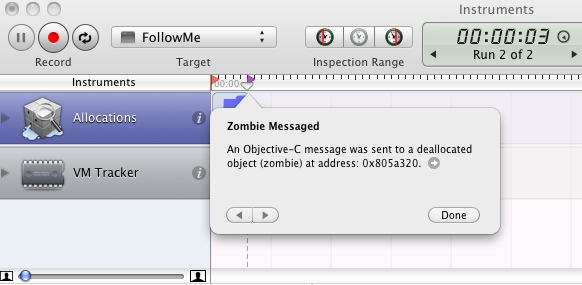
Error "EXC_BAD_ACCESS" fixed by adding "retain" to NSString

Was working on my next project and for some unknown reason, during the main loop it will work perfectly on 1st round, but then always crashed with this strange "EXC_BAD_ACCESS" error which I never seen before. Sometimes it shows this screen full of assembly languages as shown below.

Sometimes it's like this:

Tried lots of different things, like restructuring the classes, moving methods up and down the hierarchy, add lots of NSLog and checking object allocation/deallocation, check for memory leak in Instruments...etc.

Search on the net (see this one for example) and learned that the error is more about trying to call method of a object that's already deleted, not the memory leak. Have to use "Enable NSZombie detection" as shown below to check.

And I got it straight away!

After a while finally worked out that I was incorrectly doing something like this;

recordOfComputersMove = [recordOfComputersMove stringByAppendingFormat:@"%@%i",kStringSeparater,curEmptySpot];


which should actually be like this, adding the "retain" at the back fixed the problem.

recordOfComputersMove = [[recordOfComputersMove stringByAppendingFormat:@"%@%i",kStringSeparater,curEmptySpot] retain];


while working on the issue, I also read a few articles talking about this thing called "Enable Guard Malloc" (see here and here), and it took me a while to find out how to do it in XCode 4 (see here) as shown below inside "Edit Scheme".

However I think I don't understand how to use it "properly" yet as after it's been enabled, all I can see is this message as shown below, saying "stack log" been created in this file. But when I tried to open that file, it's in some sort of special format which I can't find a proper reader/editor to interpret it into a readable way.

Well, I guess most important thing for me is to identify the problem and work out a fix. That "Guard Malloc" way is definitely a bit too advanced for my level I guess...

Yeah, feels good to learn new things every day!

Monday, September 19, 2011

Use 'ima4' compression to reduce CAF file size during conversion

While playing with sound, the most frequently encountered problem will be file format conversion.

Apple has this Technical Q&A QA1534 which talks about how to create .CAF files from .AIF files using "afconvert" utility.

If you searched on the net you can also find lots of info about converting MP3/WAV to CAF files.

However I couldn't find much information about how to reduce the .CAF file size. Of course you can reduce the bit rate, but that would more or less reduced the quality of the .CAF file.

Later I found this discussion about OpenAL file formats in Apple Support Communities which talks about "IMA4" compression - which is something I never heard before.

I did a few simple experiments as below, converting same WAV file to CAF using different bit rate and "LEI16", "IMA4" data format:

afconvert -f caff -d LEI16@44100 -c 1 correct01.wav correct01_44100.caf
afconvert -f caff -d LEI16@128000 -c 1 correct01.wav correct01_128000.caf
afconvert -f caff -d 'ima4' -c 1 correct01.wav correct01_ima4.caf
afconvert -f caff -d 'ima4@44100' -c 1 correct01.wav correct01_ima4_44100.caf
afconvert -f caff -d 'ima4@128000' -c 1 correct01.wav correct01_ima4_128000.caf


The result file size is as below:


With same 44100 bit rate, using IMA4 compression reduced the file size from 313 KB to 86 KB, about 73% smaller! With the 12800 bit rate, the result is also similar. Don't know what's the default bit rate when using "-d 'ima4'" without any bit rate, the result file of 19KB is the smallest.

I guess for small, short sound effect files, should be ok with lower bit rate as it dramatically reduced the file size, but for looping or more important music, you might want to play around with the numbers a bit to get the best balance/result.

Hope you find this information helpful. And if you are aware of any better/other compression or whatever method to further reduce file size (hopefully without loosing too much sound quality?) please let me know!!

Wednesday, September 7, 2011

Yes! You can play Audio and Movies from iPhone Simulator!!

From this link on maniacdev.com I downloaded the Core Animation Demo by Bob McCune, and to my greatest delight I found that this demo project can play sound and video!! How Amazing!

I haven't work out how to do that yet, a quick look at the "resources" group in the project shows the Audio is in ".caf" format and the video is in ".m4v" format.

Will certainly spend more time to learn a bit more about that!

Saturday, August 20, 2011

Better way to handle switching between multiple view controllers?

Was looking at this sample code from Apple called "AlternateViews" which demonstrates the switching between 2 View Controllers when the device orientation changes.

I found a few interesting things about the code:

1. The "PortraitViewController" is loaded first, it then loads the "LandscapeViewController" in the viewDidLoad() of "PortraitViewController".

2. There's this new piece of code which I never seen before (as below) using NSNotificationCenter, which sets to call "orientationChanged" method when the orientation changed.


[[UIDevice currentDevice] beginGeneratingDeviceOrientationNotifications];
[[NSNotificationCenter defaultCenter] addObserver:self selector:@selector(orientationChanged:)  name:UIDeviceOrientationDidChangeNotification object:nil];


3. When the orientation changed to Landscape, it calls the following "presentModalViewController" code to switch to the "LandscapeViewController"


[self presentModalViewController:self.landscapeViewController animated:YES];


4. When the orientation changed back to Portrait, it calls the following code to switch back.


[self dismissModalViewControllerAnimated:YES];


This way of switching between multiple view controllers is new to me, plus the way the change of orientation been handled is quite interesting too. Will certainly give it a try on some of my projects.

Thursday, August 18, 2011

Following AppsAmuck's 31 Example Applications

Saw this site called AppsAmuck which provides 31 example applications. Just started yesterday and up to the 2nd one now. It's quite interesting as the site provides detail information plus the source code - although it's a bit out of date.

The 1st example is about showing a clock counting down to midnight. As shown below, the code can't compile in XCode 4, after some research on the net I got it working and added another clock on top - one showing the current time, the other showing the count down. I think this would be quite handy if you need to write some game and have a count down displayed somewhere.

The 2nd one is about animation. As the old code still compiles, I was a bit lazy and just played around with it, added another animation I downloaded somewhere (I forgot :-P ) about street fighter. Quite interesting watching it punching left, right and center above the lively fire background.

Wonder how many days can I go on, I think everyone should have a try!

Wednesday, July 27, 2011

What is "ViewPort" ?

As I mentioned in this previous post, in the HTML code example I used this META tag "<meta name='viewport' content='initial-scale=1.0' />".

I learned that from Chapter 24 "Web Views" of book "Programming iOS4". The author says according to "Safari Web Content Guide" "if no viewport is specified, the viewport can change when the app rotates. Setting the initial-scale causes the viewport size to adopt correct values in both orientations."

I searched the net and found This article from Safari Web Content Guide which provides quite a lot of information and you should have a look to learn more about "viewport".

Tuesday, July 19, 2011

Some fonts not printed correctly on "Cocoa with Love" site

Found this site called Cocoa with Love with lots of handy information, lots of them still too difficult for me unfortunately :-( ...

Was looking at this page called  Easy custom UITableView drawing, printed out from work to read it on the train. But as below (scanned from the print out), some of the words somehow not recognisable at all??!!
However when viewed from browser there's no problem at all.... very strange...

Checked the source, those fonts are covered in "<code></code>" tags, which are defined as below and doesn't seem to be unusual?


code, span.monospace {
font-family:Courier, monospace;
font-size:12px;
}

Not sure if this has anything to do with the printer or is it the CSS on the site. It's just not user friendly... Unless the author did that on purpose to stop people form printing their web pages - which I doubt it...


Any way, I learned 2 new things from that page:
(1) there's this tool called nib2objc which can convert NIB files into Objective-C, and 
(2) this free drawing tool called Inkscape
Will definitely give both of them a try!

Saturday, July 16, 2011

Colour Picker Test

Still don't know much about UIAlertView and other system default dialog boxes. Was testing this Colour Picker code from http://www.skylarcantu.com/blog/2009/08/14/custom-uialertview-color-chooser/

As screen dump above, quite nice but still don't fully understand some of the codes yet unfortunately...

For example, inside "presetSlidersWithColor" and "presetSlidersWithRandomColor", how come only calls
[self performSelector:@selector(redSliderValueChanged:) withObject:redSlider afterDelay:0.0];


Then, what about "greenSlider" and "blueSlider", don't they also have to be called?

Also this part about "setFrame" too...

- (void)setFrame:(CGRect)rect

Still got a lot more stuffs to learn...Now where was I? Got lost again... back to the schedule...