I tried adding buzzdoes to my Where is it - Smart Kids Edition today, it was quite easy and straight forward. To be honest, I actually spent more time on fixing the icon then the actual integration work...
First, you create an account and logon to their developer site, then click the "Add new iOS application" icon. You then have to download the SDK, and follow the instruction to setup your app.
The screen below shows the Apps screen, the 3 floating buttons were quite fancy. Please note that this is after I finished adding and configured my app, the "Application Name" will be different at the beginning before you configure it. You have to click on it, do some configuration (shown later) before it reads the settings and correctly shows your application name and icon.

Found 1st problem - not sure if it's because I am using the lowest "free" account, noticed I can't add another/second iOS/Android application after 1st one done? Nothing happened when I tried to click on those 3 icons.
[Update 11/Sep/2012]
The problem mentioned above seems to have been fixed somehow. I found a few problems during testing today (currently waiting for response from buzzdoes) and while doing other tests, found the button works now. As below, I just added another new iOS app, the name is "Test app for iOS", and a new App Key was provided automatically.

The configuration steps are quite straight forward too, just 3 steps as shown below. I got stuck at the first one for a while, as at first I thought it's asking for the "Bundle identifier", it's actually the "App ID" which is a long number. Adding a simple user-friendly help message (or example) would be helpful.


In fact, I didn't do these 3 steps configuration until I got all the code changes done and tested ok. Probably only need to do this if your app already published in the App Store.
For the actual integration part, as I mentioned above, most of time is playing around with the button image. As shown below, they only provide 2 sizes: 40x40 and 80x80, plus a vector file in ".ps" format which my Inkscape couldn't recognise. None of these meets my size (mine for iPhone: 96x96, for iPad 168x168), so have to manually increase the size. Plus, to create the effect of "been clicked", Cocos2D allows 2 images - normal and clicked for each button, so I have to add a semi-transparent, semi-cricle shape image on top to make it look consistent to existing ones.


You then add 2 lines of code: 1st one to activate it at load time, 2nd one when you need it to popup. As below, when the app starts, it shows this nice looking screen encouraging your users to spread the word and get reward, quite nice!


The following from iPad 2, tested when internet connection is not available. A better looking graphic/image popup would be lovely.

This is the screen when it first started, I quite like the design.

As usual, you have to approve the terms of use first as the app will be reading your address book, Facebook contact, import gmail contact, ...etc. Urh... where is the "Yes" button? Should be "Accept"... Sorry, this is quite minor, I am just fussy...

A few other screens shown below, you can login to either facebook or Gmail from here too and it will import all the contacts, quite cool!

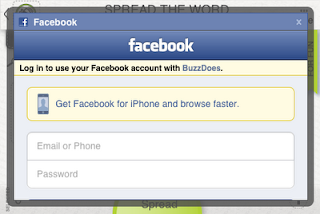
I only tested the Gmail part, after you selected those people you like to spam, sorry I mean "Spread", it will create an email. I then noticed there are 3 recipients even though I only selected 2 contacts. Oh, found the reason why, it added an extra one call "spreads@buzzdoes.com".

As my mail app on iPhone doesn't work (see my other post for details), I tried it on my iPad, received the email and it works quite well.

The overall experience with buzzdoes integration is quite clean and quick, I think you should have a try in your app too!
Now that I got my apps updated, ready for submission to App Store! Let's see if this can double, triple or quad-triple my download rate... fingers crossed...
[Update 10/Sep/2012]
Found another issue, I was testing the display of different languages and noticed the buzzdoes screen didn't pop up at all, strange? Then noticed the following message in the log:
2012-09-10 16:57:41.547 Where is it[746:27007] buzzdoes is blocked for the chosen locale. Locales other than english are not available in the free plan.
So looks like if your app supports multiple languages, you have to either upgrade from the free plan, or disable it if it's not English!
[Update 12/Sep/2012]
Found another slight issue with buzzdoes on iPhone (doesn't happen in iPad), when the buzzdoes screen get triggered, it occupies the whole screen, and it rotates automatically if users rotate/tilt the phone to the side - which is not quite suitable for games mainly in specific mode (mine is Landscape). According to Arther/buzzdoes, you can manually set the orientation as below.
First, you create an account and logon to their developer site, then click the "Add new iOS application" icon. You then have to download the SDK, and follow the instruction to setup your app.
The screen below shows the Apps screen, the 3 floating buttons were quite fancy. Please note that this is after I finished adding and configured my app, the "Application Name" will be different at the beginning before you configure it. You have to click on it, do some configuration (shown later) before it reads the settings and correctly shows your application name and icon.

Found 1st problem - not sure if it's because I am using the lowest "free" account, noticed I can't add another/second iOS/Android application after 1st one done? Nothing happened when I tried to click on those 3 icons.
[Update 11/Sep/2012]
The problem mentioned above seems to have been fixed somehow. I found a few problems during testing today (currently waiting for response from buzzdoes) and while doing other tests, found the button works now. As below, I just added another new iOS app, the name is "Test app for iOS", and a new App Key was provided automatically.

The configuration steps are quite straight forward too, just 3 steps as shown below. I got stuck at the first one for a while, as at first I thought it's asking for the "Bundle identifier", it's actually the "App ID" which is a long number. Adding a simple user-friendly help message (or example) would be helpful.


For the actual integration part, as I mentioned above, most of time is playing around with the button image. As shown below, they only provide 2 sizes: 40x40 and 80x80, plus a vector file in ".ps" format which my Inkscape couldn't recognise. None of these meets my size (mine for iPhone: 96x96, for iPad 168x168), so have to manually increase the size. Plus, to create the effect of "been clicked", Cocos2D allows 2 images - normal and clicked for each button, so I have to add a semi-transparent, semi-cricle shape image on top to make it look consistent to existing ones.

The coding part is easy, just add the files and following the instruction. Except the provided info is for pure Cocoa code, as in Cocos2D the start up function is different (in applicationDidFinishLaunching of AppDelegate). But shouldn't be too difficult for you to work that out. And I am just replacing the email button, so there's not too much code change required for my app.
The screen below shows the only 4 files you need to add to your project. I created a group/folder to avoid confusion.
You then add 2 lines of code: 1st one to activate it at load time, 2nd one when you need it to popup. As below, when the app starts, it shows this nice looking screen encouraging your users to spread the word and get reward, quite nice!

Screen below shows what it looks like before and after the change on iPhone. Only if they can provide icons with different background colours.


This is the screen when it first started, I quite like the design.

As usual, you have to approve the terms of use first as the app will be reading your address book, Facebook contact, import gmail contact, ...etc. Urh... where is the "Yes" button? Should be "Accept"... Sorry, this is quite minor, I am just fussy...

A few other screens shown below, you can login to either facebook or Gmail from here too and it will import all the contacts, quite cool!


I only tested the Gmail part, after you selected those people you like to spam, sorry I mean "Spread", it will create an email. I then noticed there are 3 recipients even though I only selected 2 contacts. Oh, found the reason why, it added an extra one call "spreads@buzzdoes.com".
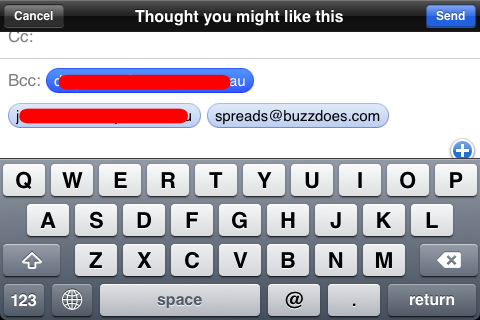
As my mail app on iPhone doesn't work (see my other post for details), I tried it on my iPad, received the email and it works quite well.

The overall experience with buzzdoes integration is quite clean and quick, I think you should have a try in your app too!
Now that I got my apps updated, ready for submission to App Store! Let's see if this can double, triple or quad-triple my download rate... fingers crossed...
[Update 10/Sep/2012]
Found another issue, I was testing the display of different languages and noticed the buzzdoes screen didn't pop up at all, strange? Then noticed the following message in the log:
2012-09-10 16:57:41.547 Where is it[746:27007] buzzdoes is blocked for the chosen locale. Locales other than english are not available in the free plan.
So looks like if your app supports multiple languages, you have to either upgrade from the free plan, or disable it if it's not English!
[Update 12/Sep/2012]
Found another slight issue with buzzdoes on iPhone (doesn't happen in iPad), when the buzzdoes screen get triggered, it occupies the whole screen, and it rotates automatically if users rotate/tilt the phone to the side - which is not quite suitable for games mainly in specific mode (mine is Landscape). According to Arther/buzzdoes, you can manually set the orientation as below.
To set manually the orientation please use the following code:
[BuzzDoes BuzzSharedInstance].supportsPortraitOrientation=NO;
The optional properties are:
supportsLandscapeLeftOrientation
supportsLandscapeRightOrientation
supportsPortraitOrientation
supportsPortraitUpsideDownOrientation
Default value is YES.


